
Navigation Guide: Credit Conversion
View your credit conversion breakdown and understand how it works
 By pamelaqiuxuan
• 2 weeks ago
By pamelaqiuxuan
• 2 weeks ago What's happening?
Following the iProperty credit conversion, your Listing Credits and Featured Credits will now be displayed as Ad Credits in the iProperty PRO's subscription page. This provides a clearer and more transparent view of your credit usage and history.
What’s new at a glance?
Clear credit breakdown on the credit conversion under Subscription and Credit History and easier tracking of how your old credits are converted.
Desktop, Web & App Experience
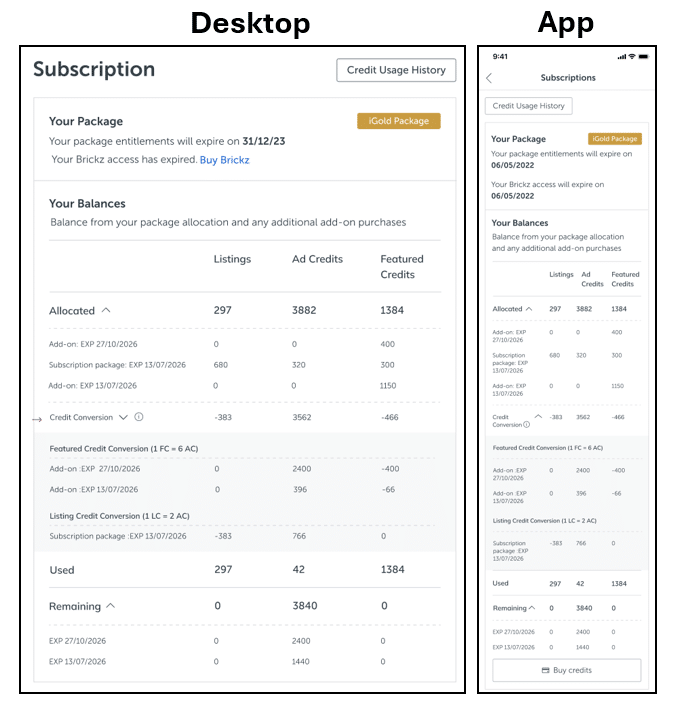
Where can I view my credit conversion?
You can view your credit conversion details in the Subscription Page, under the credit conversion section. There are 2 subsections that separately itemize your credits:
-
- - Featured credit conversion (1FC = 6AC)
- - Listing credit conversion (1LC = 2AC)
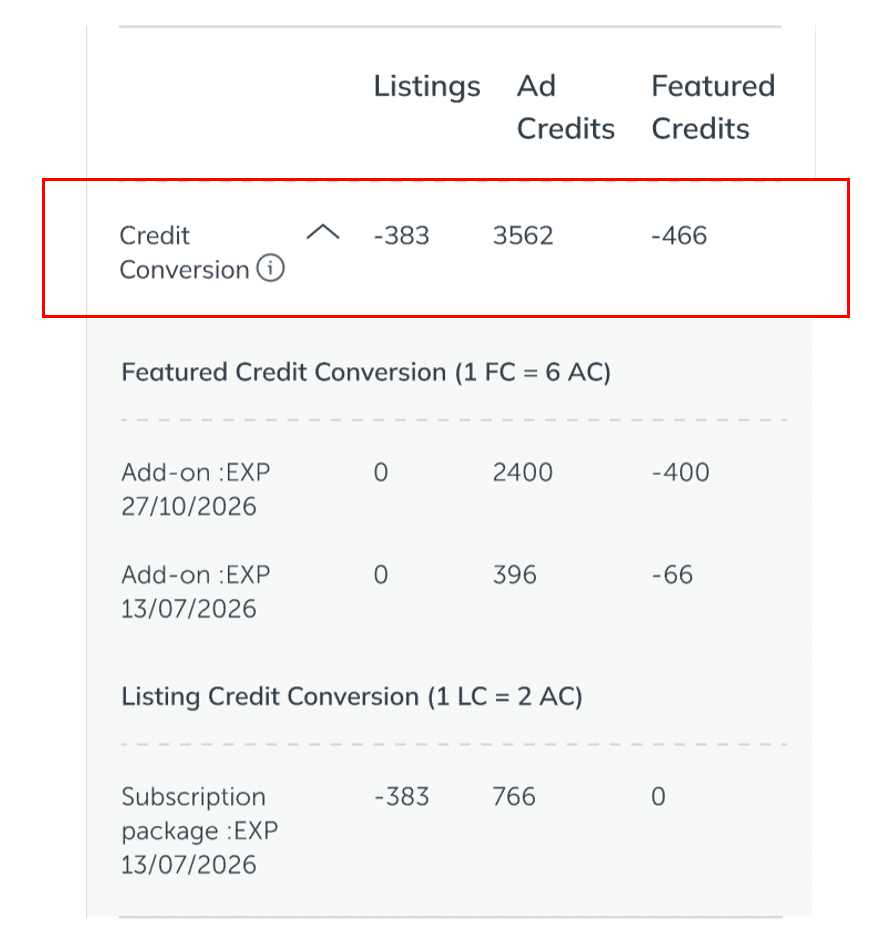
The first row shows the overall credit conversion summary as of 1 April 2026.
-
- - Negative numbers indicate credits that were deducted from your remaining balance during the conversion.
- - Positive numbers indicate credits that were added to your Ad Credits (AC) as a result of the conversion.
Example: Listings −383, Featured Credits −466, Ad Credits +3562.
How do I read my credit conversion details?
You’ll see two sub-sections showing the conversion rules applied.
-
-
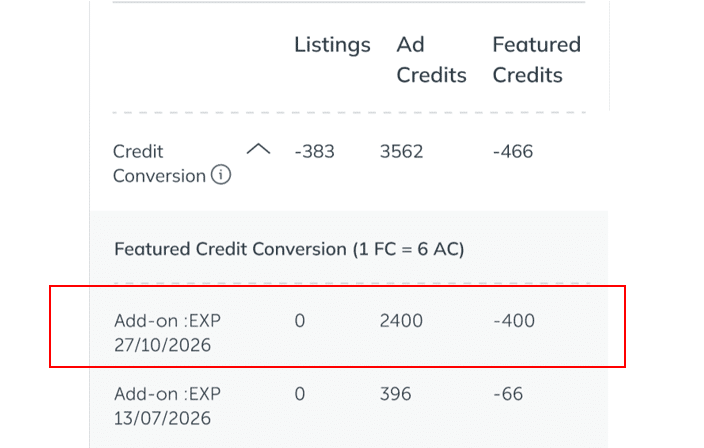
- Featured Credit Conversion (1 FC = 6 AC)
-
Each row shows the original allocated credit description (e.g., Add-on EXP 27/10/2026) with:
-
-
- - Featured Credits: negative value (deducted)
- - Ad Credits: positive value (added)
-
Example: 0 | 2400 | -400 means 400 Featured Credits were deducted and converted into 2400 Ad Credits, based on the conversion rule 1 FC = 6 AC
*The expiry date shown is the original allocated expiry date that the converted Ad Credits inherit.
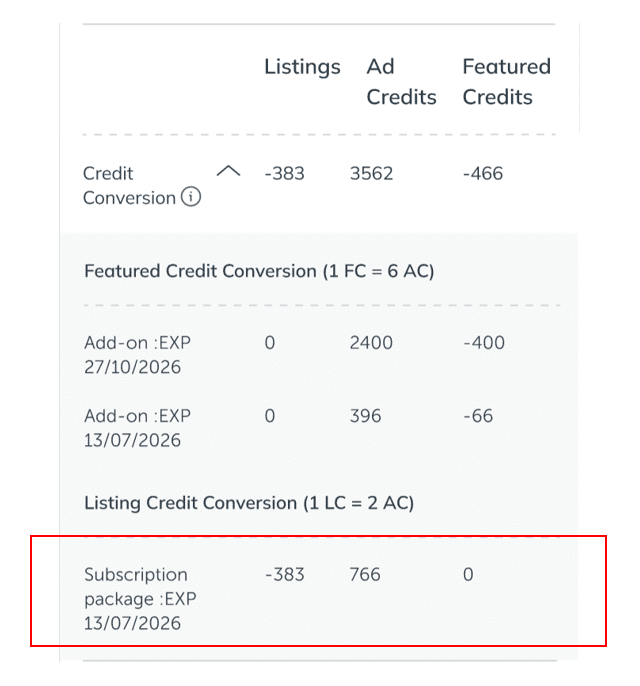
2. Listing Credit Conversion (1 LC = 2 AC)
Each row shows the original allocated credit description (e.g., Subscription package EXP 13/07/2026) with:
-
-
- - Listings Credits: negative value (deducted)
- - Ad Credits: positive value (added)
-
Example: −383 | 766 | 0 means 383 Listing Credits were removed and converted to 766 Ad Credits, based on the conversion rule 1 LC = 2 AC.
*The expiry date shown is the original allocated expiry date that the converted Ad Credits inherit.
How will different agent types see their credits?
1. New Sign Up Users
New sign up experience depends on the package activation timing.
- If package is activated before 1 April 2026
-
-
-
Credits will follow the standard conversion rate, and all Featured Credits or Listing Credits will be converted to Ad Credits.
-
-
- If package is activated after 1 April 2026
-
-
- Credits will follow the latest updated package Ad Credits allocation.
-
2. Existing Users
Existing users will see the remaining balance of their Featured Credits and Listing Credits from their current subscription packages and discretionary purchases converted to Ad Credits on 1 April 2026.
3. Renewal Users
Renewal users renewed package entitlement will appear above their existing subscription package depending on the renewal date.
- If package is renewed before 1 April 2026
-
-
-
Both existing and renewed subscription package Credits will follow the standard conversion rate, and all Featured Credits or Listing Credits will be converted to Ad Credits.
-
-
- If package is renewed after 1 April 2026
-
-
-
Remaining credits from existing subscription package will follow the standard conversion rate and new subscription package credits will follow the latest updated package Ad Credits allocation.
-
-
For common questions about the credit conversion, view our Frequently Asked Questions article.
For general enquiries, please reach out to our Customer Service at the following:
Phone: +603 6419 5188 (Mon - Fri 9am - 6pm, closed on PH)
Email: customercare@iproperty.com.my
For technical assistance, please message us via WhatsApp at +60 17 943 9107
(Mon - Fri 9am - 9pm, closed on PH) (no phone call, message only) and we will get back to you within 1 working day.